


The strongest Wispr Flow alternative depends on your platform: SuperWhisper on Mac, OpenWhispr or VoiceTypr on Windows, and free open-source builds if you refuse subscriptions. Most advice on this topic quietly assumes you own a Mac, then hand-waves the other half of the audience.
The field sorts cleanly by the machine you type on, so start from your platform, check the price structure second, and only then compare features. Each pick below also comes with the gap it leaves against the tool you are leaving.
Why people quit Wispr Flow
People leave Wispr Flow for three repeating complaints: a $144-a-year subscription that never ends, audio that has to travel to cloud servers for every sentence, and a perceived slide in transcription quality that switchers keep describing on Reddit.
The money first. Wispr Flow’s paid plan is listed at $12 a month billed annually, which lands at $144 a year for dictation. The free tier exists but caps your weekly words, so daily users graduate to paying quickly. The cloud is the second issue: your audio leaves the machine for transcription, which rules the tool out for anyone dictating medical notes, legal drafts, or client work under confidentiality terms. It also means no dictation on a plane or through spotty hotel Wi-Fi.
The third complaint is newer and softer, but it is the one pushing people to open source:
“seeing more Wispr Flow users say the quality has dropped lately, especially around accuracy, cleanup, and how much editing is needed after dictation. has anyone here moved to open source alternatives instead? I’ve seen people mention FluidVoice, FreeFlow, Ope…”
– r/opensourcealternative, June 2026 (14 upvotes)
One correction before the list, because stale information floats around this topic: Wispr Flow is no longer Mac-only. It ships for Mac, Windows, and iPhone. If you saw “Mac-only” cited as the dealbreaker, that reasoning is out of date; the price and the cloud dependency are the live issues.
The quick Wispr Flow alternative answer, by platform
| Your setup | First pick | Price | Engine |
|---|---|---|---|
| Mac, privacy first | SuperWhisper | About $85/yr or $249 lifetime | Local Whisper models |
| Mac, zero budget | FluidVoice | Free, open source | On-device |
| Windows | VoiceTypr | $59 lifetime, or build from source | Local |
| Mac + Windows + Linux | OpenWhispr | Free local, bring your own API key | Local or cloud, your choice |
| Any browser, any OS | Google Docs Voice Typing | Free | Google cloud, Docs only |
| Windows, specialist vocab | Dragon Professional | Around $700 one-time | Local, needs voice training |
Every row above works without a monthly fee. That is the structural shift in this category: transcription that used to demand a server now fits on a laptop, so one-time licenses and free builds became viable business models. The Whisper family of speech models made local processing good enough that a subscription has to justify itself on polish, not capability.
The Mac shortlist: SuperWhisper, VoiceInk, FluidVoice
SuperWhisper is the pick most switchers name first. It processes audio on your Mac, works offline once its models are downloaded, and lets you choose model sizes: small ones respond faster, large ones transcribe better and eat more RAM. Where it beats Wispr Flow on features, not just privacy, is configurable modes:
“In SuperWhisper you can configure specific prompts for certain behaviors. For example, you can create a preset for a formal tone, a preset for a friendly tone, a preset for a humorous tone, and so on. You can also create a preset to automatically translate into another language.”
– r/macapps, January 2026 (7 upvotes)
Budget for the trade-offs. Local models take up several gigabytes of disk, drain more battery than a cloud call, and their raw accuracy trails the big hosted models, so expect a little more cleanup on rare words. Pricing sits around $85 a year, with a $249 lifetime license for people who intend to dictate for years.
VoiceInk is the value version of the same idea: GPL-licensed, on-device, sold as a modest one-time license, and free if you compile it yourself from the source. FluidVoice is the fully free community darling; Reddit switchers report it holding up well against the tool they left, with the caveat that there is no iPhone companion yet.
Apple’s built-in dictation deserves one honest paragraph. On Apple Silicon it transcribes on-device for free, and for a two-sentence message it is fine. Sessions cut off after short silences, vocabulary is not customizable, and long-form accuracy sits well below the dedicated tools, so treat it as the demo that tells you whether you like talking to your computer at all.
Windows and Linux: OpenWhispr, VoiceTypr, FreeFlow
Windows users get fewer listicle mentions but arguably the better deal, because the strongest options here are open source.
OpenWhispr is MIT-licensed and the rare option that treats Mac, Windows, and Linux as equals. It transcribes locally for free, and if you want cloud-grade accuracy you plug in your own API key and pay the provider’s per-minute rate, which for light use amounts to pocket change. That bring-your-own-key pattern is the budget sweet spot this whole category is converging on: the app is free, and you buy raw transcription at cost from whoever sells it cheapest. The same math is pulling developers off flat-fee coding subscriptions, as the OpenCode vs Claude Code decision shows.
VoiceTypr takes the packaged route for people who would sooner pay $59 once than touch a build toolchain: AGPL-licensed source you can compile for free, or a lifetime-license binary for Mac and Windows. FreeFlow rounds out the trio, a free open-source project with an edit mode for cleaning up what you said and optional local-model support, and its commit history shows active, ongoing development.
Dragon Professional is the legacy answer for Windows and still the right one for a narrow group. It costs around $700 once, processes everything offline, and its legal and medical vocabularies have decades of depth. It also wants a training period of read-aloud passages, expects spoken punctuation, and its development pace has slowed under Microsoft. Buy it for specialist vocabulary, not for convenience.
What three years actually costs
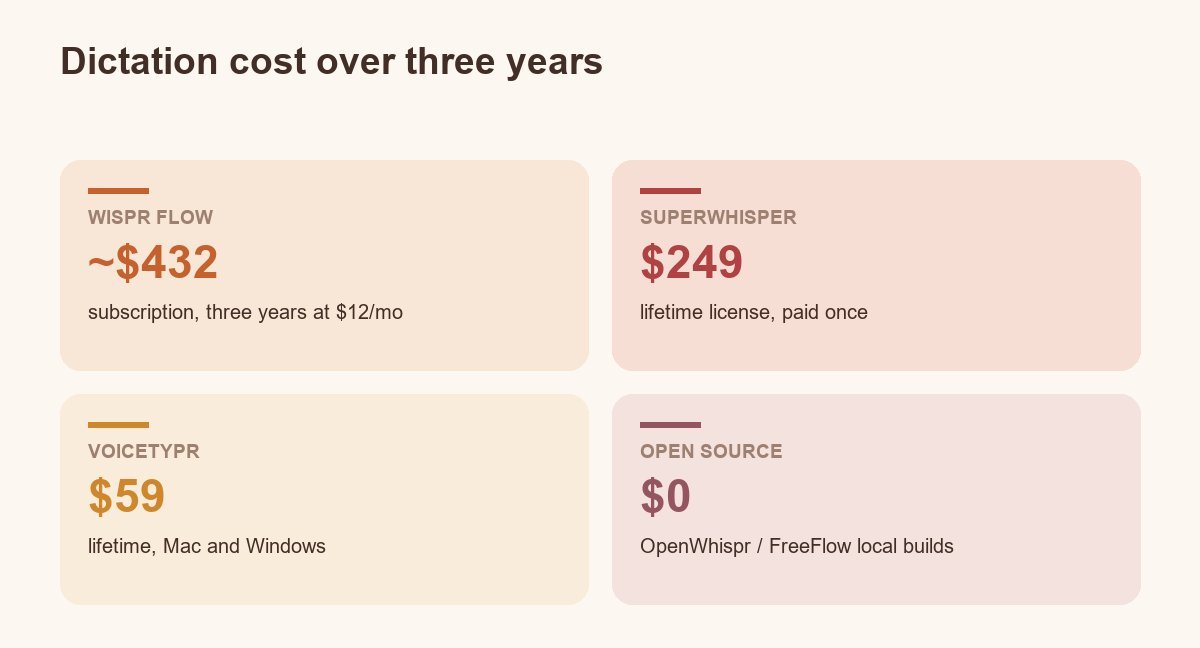
Subscriptions hide their totals, so run the math once. Wispr Flow at $12 a month reaches roughly $432 over three years, and the meter keeps going after that. SuperWhisper’s $249 lifetime license beats it partway through year two. VoiceTypr’s $59 lifetime undercuts a single year of the subscription. The open-source builds hold at zero forever, trading money for your time on setup and the occasional rough edge.
Price the API path fairly too. A bring-your-own-key setup on OpenWhispr or Spokenly bills per minute of audio, so a heavy talker could in theory out-spend a flat subscription. In practice, casual and moderate users report their provider’s free tier absorbing most of it. If you dictate hours daily, do one week on a metered key and read the bill before committing either way.
Where every alternative falls short
Every alternative on this list gives up something Wispr Flow does well, and the four gaps below are the ones switchers actually hit: mobile coverage, AI cleanup, personalization, and setup effort.
- Phones. Most of the tools above are desktop software. Wispr Flow’s iPhone app and keyboard have no equal among the open-source picks yet; SuperWhisper and Spokenly have iOS versions, Android is a wasteland.
- AI cleanup quality. Wispr Flow’s strength was never raw transcription, it was reshaping rambling speech into finished text. Local tools with small models do less of that, and the gap shows on messy, self-correcting speech.
- Context personalization. The r/macapps thread that kicked off half this discussion was a user asking for dictation that knows their vocabulary and context. No tool in this list fully solves that either; presets in SuperWhisper are the closest lever.
- Setup tax. Free means you are the IT department. Model downloads, permissions, hotkey conflicts, and for source builds a working toolchain. VoiceTypr and SuperWhisper exist precisely because plenty of people would sooner pay once than configure twice.
FAQ
What is a better alternative to Wispr Flow?
SuperWhisper is the strongest overall alternative on Mac, with local processing and a lifetime-license option; OpenWhispr is the best cross-platform pick since it is free, open source, and works on Mac, Windows, and Linux. Which one is better for you depends on whether privacy, price, or platform coverage drove the switch.
Is there a free version of Wispr Flow?
Wispr Flow offers a free tier with a weekly word cap, enough for light use but tight for daily dictation. If the cap is the problem, FluidVoice on Mac, OpenWhispr on any desktop OS, and Google Docs Voice Typing in the browser are free without word limits.
What are good Wispr Flow alternatives for Mac?
SuperWhisper, VoiceInk, and FluidVoice are the three Mac-native picks, all processing audio on-device. SuperWhisper has the deepest feature set, VoiceInk is the budget one-time license, and FluidVoice is free and open source.
Is SuperWhisper better than Wispr Flow?
SuperWhisper wins on privacy, offline use, and lifetime pricing; Wispr Flow wins on out-of-the-box polish, AI cleanup of rambling speech, and its iPhone keyboard. Test SuperWhisper’s small model first: if its accuracy satisfies you, the switch pays for itself within two years.
Whichever direction you go, keep the trial honest: dictate the messiest thing you write in a normal week, not a clean test sentence. Punctuation habits, jargon, and self-corrections are where these tools separate, and a week of your own words will settle the choice faster than any list.

