


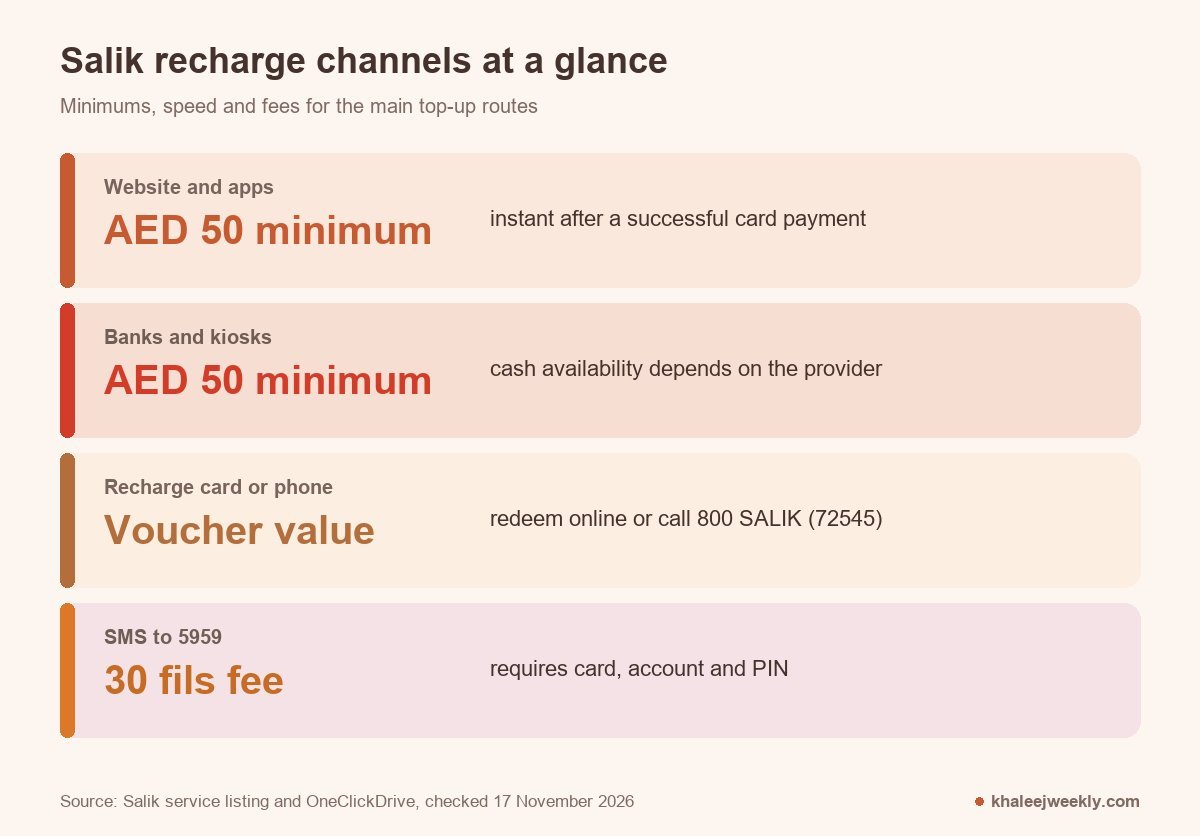
For the fastest Salik recharge, open salik.ae, Smart Salik or the RTA Dubai app, select Recharge and pay by card. Salik’s service listing sets the minimum at AED 50 in multiples of AED 50, while OneClickDrive’s October 2026 channel review reports an immediate balance update after payment.
You only need the registered mobile number and plate details, or the Salik account number and PIN.
Last checked: 17 November 2026.
- Minimum online, app, bank or kiosk top-up: AED 50.
- Maximum single transaction: AED 50,000.
- Standard website and app fee: no Salik service fee.
- SMS recharge fee: 30 fils, including VAT, charged by the mobile operator.
- Arrival time: immediately after a successful payment or voucher redemption.
Before you pay: find the right Salik account
Salik can identify an account through its number and PIN, or through the mobile number registered with Salik and the vehicle plate details. The call centre also accepts a plate number with the tag number printed on the back of the tag.
Plate entry includes the source, category, colour and number. Similar household vehicles and a recent mobile-number change make careful identification especially useful.
Check every plate field.
Salik recharge online: website and apps
Salik website or Smart Salik app
The website allows a top-up without a full account login. Smart Salik requires sign-in before choosing Recharge, but the resulting balance and recent trips then appear on the same dashboard.
- Open salik.ae or Smart Salik and choose the recharge service.
- Enter the account number and PIN, or the registered mobile number and plate details.
- Choose an amount from AED 50 upwards in multiples of AED 50, without exceeding AED 50,000.
- Pay by card, then return to the account dashboard and confirm the revised balance.
Salik lists no service fee for a standard website or app recharge. Card provider terms still apply. Keep the payment receipt.
RTA Dubai, Dubai Now, Careem and TAMM
You can use an app already on your phone without creating another Salik profile. OneClickDrive’s sourced channel comparison lists the same AED 50 minimum and immediate balance update across these routes.
- RTA Dubai: open Salik, then Recharge.
- Dubai Now: select Salik and enter your account number and PIN.
- Careem: open Bills & recharges, then Salik.
- TAMM: open My Utilities, then Salik.
Other ways to recharge: cash, card or SMS
Recharge cards at petrol stations and partner shops
OneClickDrive’s October 2026 summary lists Salik recharge cards at ENOC, ADNOC and Emarat petrol stations, with e-vouchers available through Axiom Telecom and its partners. A card or e-voucher can be redeemed through salik.ae, Smart Salik, RTA Dubai, the self-service telephone line or SMS.
Keep the voucher until the new balance appears; its recharge number identifies the transaction.
Salik kiosks and bank cash machines
A Salik kiosk accepts cash after entry of the account number and PIN. Cash deposits are also available through Emirates NBD and Dubai Islamic Bank cash deposit machines, according to the same channel review.
Other participating banks offer different combinations of online banking, mobile banking, ATMs, cash deposit machines, telephone banking and SMS. Confirm the route before travelling.
SMS and telephone redemption
For an SMS recharge, send R*recharge-card-number*Salik-account-number*PIN to 5959. Salik’s service listing states that the mobile operator charges 30 fils, including VAT, for each SMS recharge.
Cards can also be redeemed through the self-service line on 800 SALIK (72545). Have the recharge card, account number and PIN ready before calling. Confirm the new balance.
Automatic top-up and balance checks
Set up automatic recharge through your bank
Automatic Salik top-up is arranged through participating banks. OneClickDrive’s review of Salik’s channels identifies banks as the route for this service, so ask your bank whether it supports automatic payments, which balance trigger applies and how much each payment will add.
Set the amount against the peak and off-peak Salik charges expected during the month.
Confirm both entries after the first payment.
Balance checks by website, app, kiosk or phone
On salik.ae, choose the balance service and enter the registered mobile number with the plate source, category, colour and number. Smart Salik and RTA Dubai display the balance in their Salik sections, while kiosks and the 800 SALIK self-service line provide alternatives.
If you are deciding how much to load, the monthly Salik cost calculator estimates toll spending before you choose a top-up amount. It does not access the live Salik balance.
Low balance, wrong account and rental cars
If the balance runs out after a toll crossing
OneClickDrive’s summary of Salik’s rule reports five working days from the trip date to recharge. After that window, an AED 50 insufficient-funds violation applies for each day on which trips were made, with a maximum of one such violation per vehicle per day.
A warning SMS is not guaranteed. Logged-in users can see unpaid trips with a countdown showing how long remains before they become violations. Treat that countdown as the deadline.
“If you drove through those gates without enough balance, youd be charged twice.”
– r/DubaiPetrolHeads, November 2026 (2 upvotes)
Review the trip history. That comment describes one driver’s reading of an account entry, not proof of a duplicate toll. Distinguish unpaid crossings from any separately posted violation.
If you recharged the wrong account
Call 800 SALIK (72545) promptly with the payment receipt and both sets of account details. Salik states that recharge balances are neither refundable nor transferable, so support cannot be expected to move the payment automatically. Act before making another top-up.
If you are driving a rental car
Do not add money to a rental vehicle’s Salik account yourself. OneClickDrive explains that the vehicle owner remains responsible for tolls and violations; for a rental vehicle, that owner is the rental company.
The rental company pays through the account attached to its tag and bills the customer under the rental agreement. Before signing, ask what it charges for each crossing and whether an administration or service fee applies.
Keep the receipt. If payment has already gone into an account connected with the rental vehicle, contact both the rental company and Salik; the rule against transferring or refunding a balance still applies.
Salik recharge questions
How long does a Salik recharge take?
A Salik recharge through the website, apps, banks or kiosks updates immediately after successful payment, according to OneClickDrive’s comparison. If the balance stays unchanged, verify the account details and payment receipt before calling 800 SALIK.
Does a Salik balance expire?
A Salik balance can be forfeited after five years with neither a recharge nor a trip, according to OneClickDrive’s summary of Salik’s FAQs; either activity prevents that inactivity condition from being met.
Can you top up another person’s Salik account?
Yes. OneClickDrive reports that the Salik website accepts another person’s account number and PIN, or their registered mobile number and plate details. Verify those details with the account holder because Salik balances cannot be transferred or refunded.
