


HyperFrames is HeyGen’s free, open-source framework that turns HTML, CSS, and JavaScript into rendered video files. You describe the video you want, a coding agent writes the markup, and HyperFrames plays it back or renders it into a standard MP4.
The interesting part is not the rendering. It is that video finally becomes a text artifact, which means the same AI agents that write your code can now write, revise, and re-render your videos. That single property explains why the project keeps topping GitHub’s trending page while polished video generators sit right there, one tab away.
What is HyperFrames and how does it work?
HyperFrames loads an HTML document in a headless browser, steps through time under its own control, screenshots each frame, and compiles the frames into a video with FFmpeg. Because the framework advances the clock itself instead of recording live playback, a slow machine cannot drop frames: a 10-second animation at 30fps produces exactly 300 frames, every time.
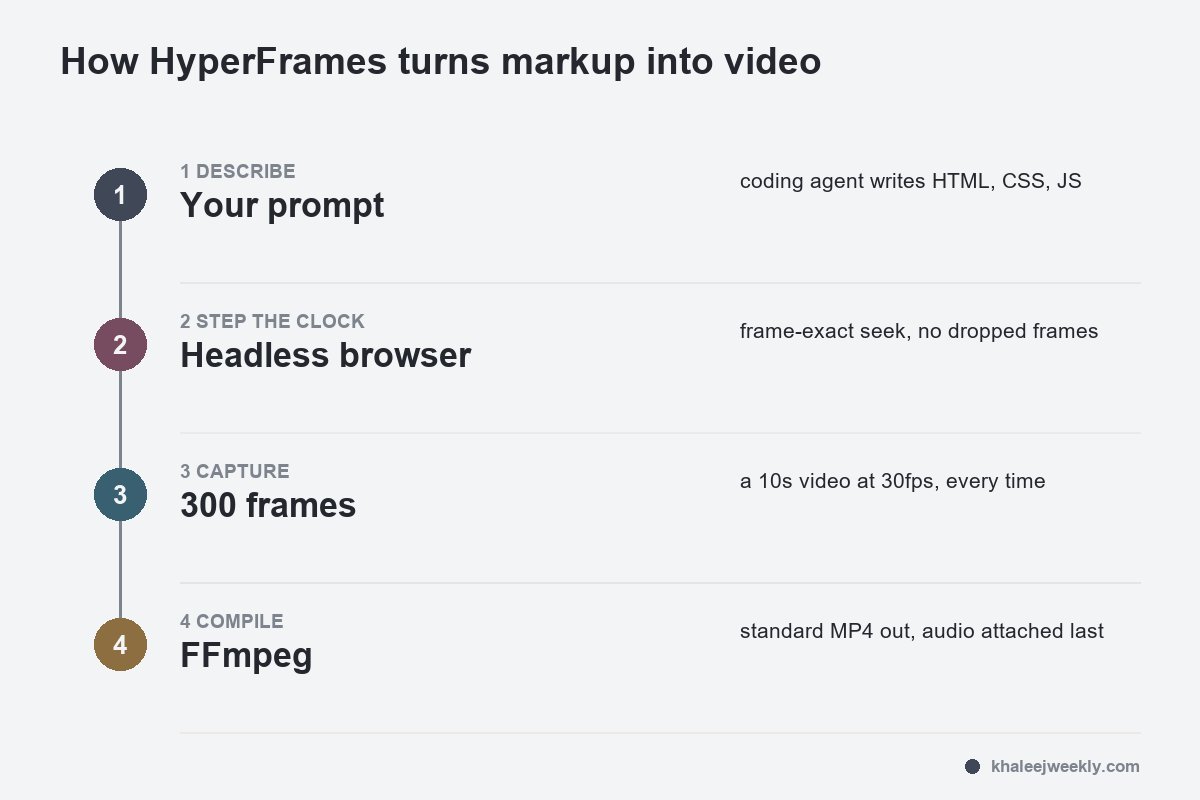
The output of a session is an editable project folder, not a flattened file. HeyGen’s docs stress three interfaces working on the same files: your coding agent (revise by chat), a visual Studio (timeline-style edits by hand), and a CLI (npx hyperframes render --output video.mp4). Audio is attached at the end of the pipeline, typically through FFmpeg, so narration or music gets generated separately and merged into the final cut.
Why AI coding agents took to it so fast
Diffusion video models generate pixels an agent cannot meaningfully edit; if the third second is wrong, you regenerate and pray. HyperFrames videos are code, and code is the one medium coding agents already handle well. “Make the title larger, switch to dark mode, cut the intro to four seconds” become ordinary text edits followed by a deterministic re-render.
Setup leans on the same agent-skills ecosystem the coding tools share. One command (npx skills add heygen-com/hyperframes) installs the skills, and from then on a /hyperframes request inside Claude Code, Codex, or another agent produces a first cut. Early adopters name the simplicity as the draw:
“Haven’t gotten a chance to try it out yet. Just saw the release of it. I like how it’s just HTML and not react like with Remotion. Just simpler. Will definitely give this a try over the weekend.”
– r/buildinpublic, April 2026 (4 upvotes)
HyperFrames vs Remotion vs AI video generators
Three different bets on how video should be made, and the right one depends on who is doing the editing.
| HyperFrames | Remotion | Diffusion generators (Sora-style) | |
|---|---|---|---|
| You author in | Plain HTML/CSS/JS | React components | Text prompts |
| Who edits best | AI agents and non-React devs | React developers | Nobody; you regenerate |
| Output style | Motion graphics, UI, data | Motion graphics, UI, data | Photoreal or cinematic footage |
| Determinism | Frame-exact, repeatable | Frame-exact, repeatable | Different every run |
| Cost to render | Free, local | Free core, paid company license tiers | Per-generation credits |
The Remotion comparison is the live debate, enough that HeyGen wrote an official guide on it. The practical split: Remotion gives React teams typed components and a mature ecosystem; HyperFrames drops the React requirement so any agent that can write a web page can make a video. One Remotion user weighing the switch put the trade-off plainly:
“HeyGen just dropped HyperFrames, an open source framework that converts HTML to MP4. Looks interesting but haven’t tried it yet. I’ve been using Remotion with Claude Code to create videos for my SaaS and yesterday I made a launch video I’m actually happy with in less than 3 hours. The workflow is pretty sick, you just describe what you want and Claude Code builds the whole thing in Remotion. Scenes, animations, transitions, everything. But Remotion has its quirks. Setup isn’t trivial and someti…”
– r/buildinpublic, April 2026 (9 upvotes)
Notice what that workflow already was: describe, let the agent build, render. HyperFrames did not invent the pattern; it removed the framework tax on it. If your coding agent is already the one doing the work, the choice of harness matters there too, and the logic mirrors the OpenCode vs Claude Code decision: pick the layer that keeps you free to swap the parts underneath.
What it makes well, and what it does not
The showcase films on HeyGen’s docs are honest about the lane: product intros, explainer and data-visualization videos, pull-request walkthroughs, music-synced cuts, per-person generated cards, color-graded footage assembled in Studio. Anything whose ingredients are text, charts, UI, and motion design renders beautifully from markup.
The boundary sits where pixels have to be invented. HyperFrames cannot conjure a photoreal scene, an actor, or cinematic camera work; that stays diffusion-model territory, and teams that need both end up pairing the two, generated clips embedded inside a HyperFrames project like any other media file. It also shines brightest with a coding agent in the loop; hand-writing keyframe CSS yourself is possible but recreates the exact labor the tool exists to delete.
Getting started is one pasted prompt
The quickstart is genuinely three lines: run npx hyperframes skills update, ask your agent for a 10-second product intro using /hyperframes, and open the local preview. Rendering locally is free and burns no HeyGen credits; costs only appear if you add optional hosted services like voices or avatars, or through whatever your coding agent itself charges.
Watch the first cut skeptically, the way the docs themselves advise: check the story, the facts, the readable text, and the sound before calling it done. The agent drafts fast; it does not proofread.
FAQ
Is HyperFrames free?
Yes. HyperFrames is open source, and rendering videos locally uses no HeyGen credits. Optional hosted services, such as voices, avatars, or generated media, carry their own costs, as does the AI coding agent you pair it with.
How do I install HyperFrames?
Run npx skills add heygen-com/hyperframes in a project folder, choose Core Skills, and restart your coding agent there. From then on, a /hyperframes request makes videos, and npx hyperframes preview reopens any project’s local preview.
Can HyperFrames work with real filmed footage?
Yes, as material rather than as output: the showcase includes real footage graded with LUTs and curves inside Studio, and rendered into multiple cuts. What it cannot do is generate new footage; it renders what markup and media files describe.
The one-line verdict: treat HyperFrames as the video layer of the agent stack, not as a rival to cinematic AI video. If your videos are made of information, the markup route gets you an editable, re-renderable, zero-credit pipeline today, and the trending-page numbers say a lot of developers just reached the same conclusion.

